Inviting Speakers, Co-Hosts and Guests to Your miingl Event
Intro
What You’ll Learn in This Article
By the end of this guide, you’ll know how to:
Invite guests and speakers to a miingl event
Send invitations by email, phone number, or CSV upload
Add participants after an event is created
Manage existing invitees
Designate and manage co-hosts
Before You Begin
To invite participants to an event, you must:
Have a miingl account (Sign Up)
Have already created a miingl event
Step-by-Step Instructions
1. Access the Invite Participants Screen
After creating your event, you’ll be taken directly to the Invite Participants screen.
From here, you can invite participants by:
Uploading a CSV file (up to 50 invitees at a time)
Entering names, email addresses, or phone numbers manually
Customize your SMS or Email Invites (by Scrolling Down)
2. Enter Participant Information
For each participant:
Enter their name and either:
An email address (they’ll receive an email invite), or
A phone number (they’ll receive a text invite)
Both a name and contact method are required to send an invitation.
3. Search for Existing Participants
If you’ve invited someone to a miingl event before:
Start typing their name, email, or phone number
Select them from the search results to add them quickly
4. Send the Invitation
To send invitations:
Check the I’m Not a Robot box
Click Invite Participants
Your invitations will be sent immediately.
Inviting Participants After Event Creation
5. Access Your Event
To invite more participants later:
Click My Events
Click the event tile on your events list
6. View the Attendee List
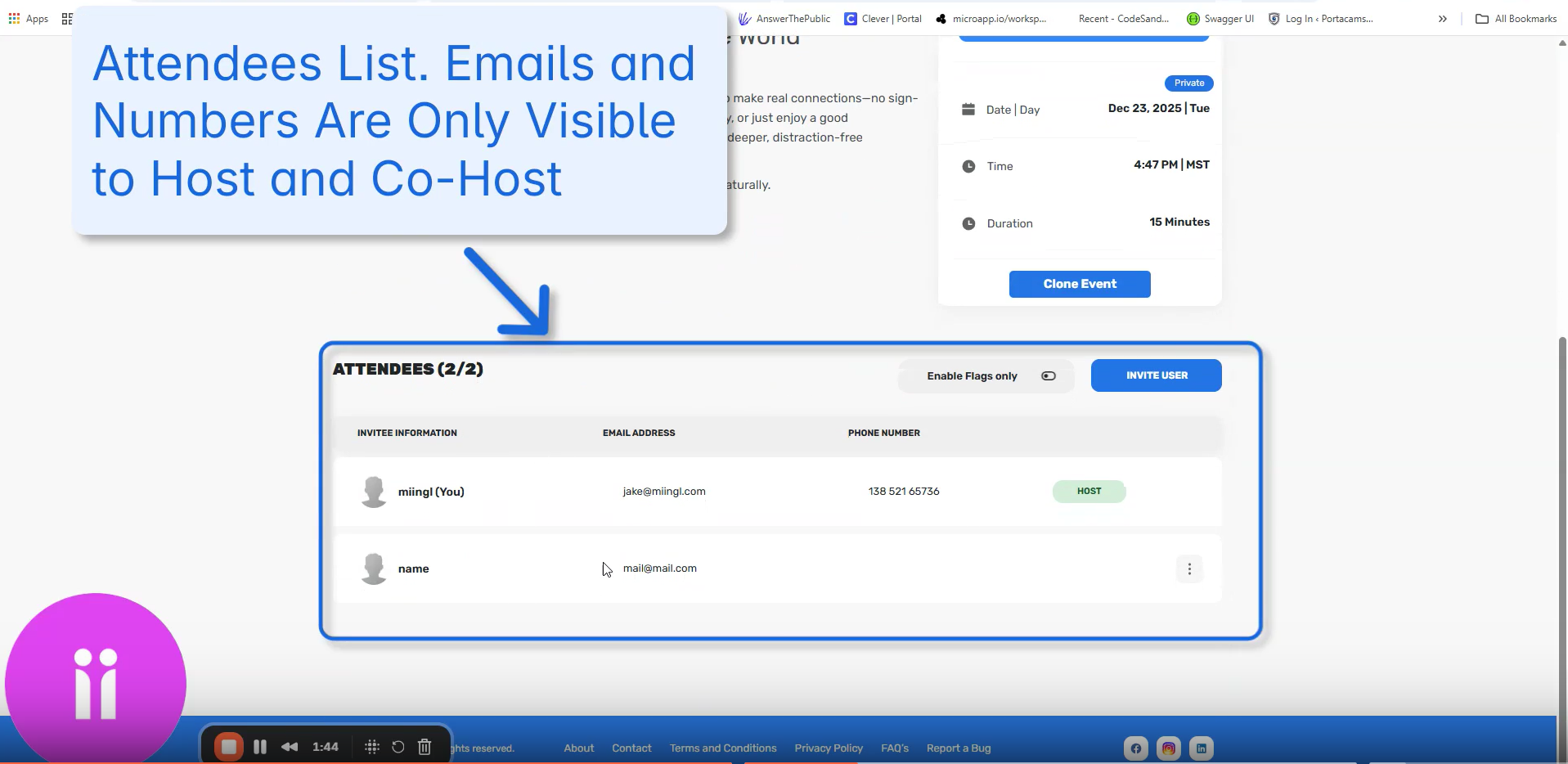
On the event details page:
Scroll down to view:
Invited guests
Interested attendees
Confirmed participants
Co-Hosts
Emails & Phone Numbers (only visible by the Host & Co-Hosts)
7. Invite Additional Participants
Click Invite User to return to the Invite Participants screen
Add new guests using the same invite methods
8. Manage Existing Invitees
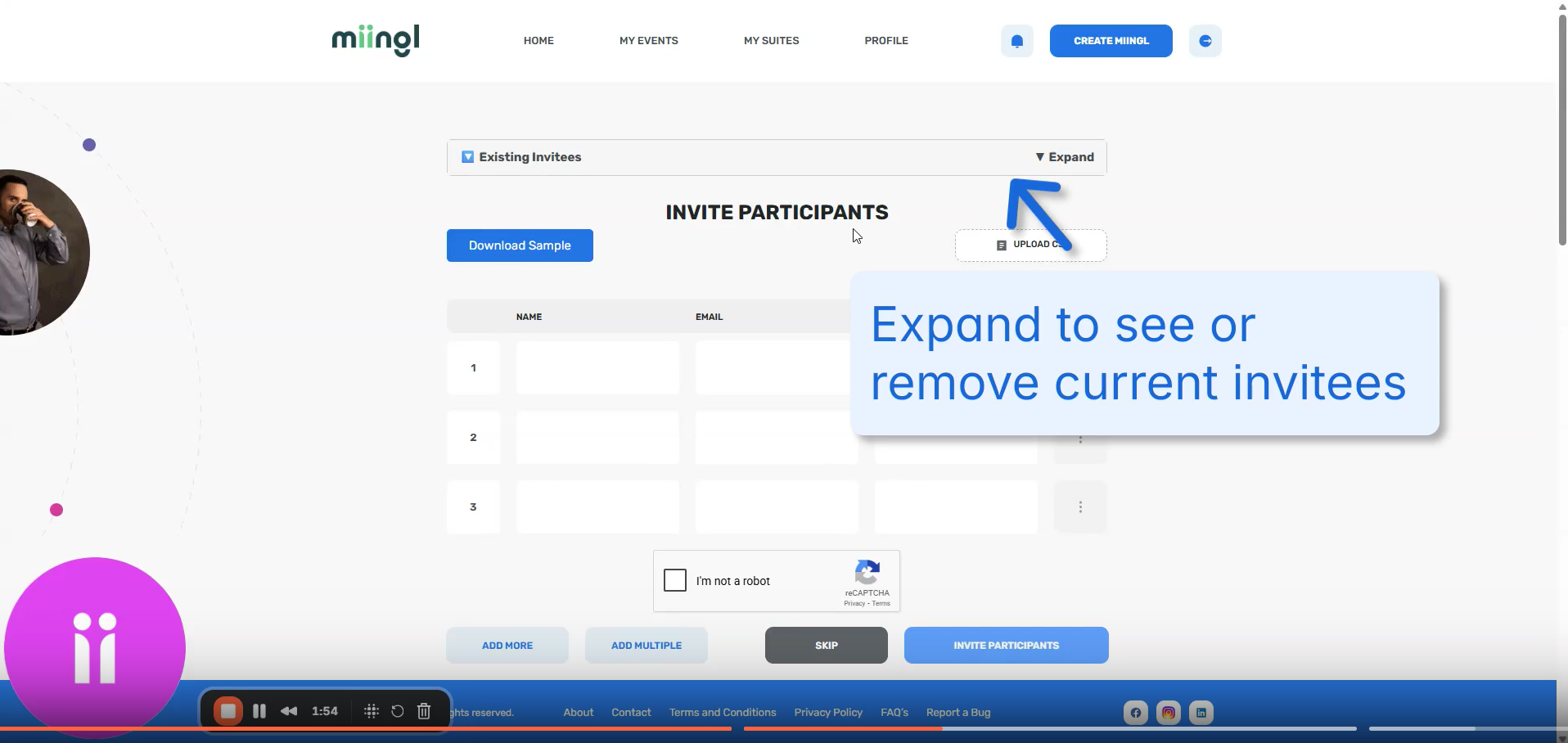
You can expand the invitee list to:
Remove participants (useful for private events)
Seeing Pending and Confirmed Details
See when the invite was sent
Inviting and Managing Co-Hosts
9. Invite a Co-Host
To invite someone as a co-host:
Enter their name, email, or phone number
Select the Co-Host under the 3 dot menu next to their phone number option before sending the invite
Co-hosts have access to host-level controls during, before, and after the event.
10. Manage Co-Host Status
From the event details page, you can:
Assign co-host status by clicking the 3-dot menu next to the participant's phone number
Remove co-host privileges by clicking the 3-dot menu to the right of the participant's phone number
View current co-hosts
Need Help?
If you have questions or need assistance:
Ask the miingl community for support
Submit a support ticket for additional help
Watch the Walkthrough
What’s Next?
Once your guests have joined your event, you may want to explore:
Related Articles
Setting Up Your miingl Workshop or Event Space
Intro This article explains how to set up a workshop or event space on miingl, from creating the event to inviting participants and tracking attendance. What You’ll Learn in This Article By the end of this guide, you’ll know how to: Create a new ...Hosting Your First Workshop or Event on miingl
Intro This article explains how to start and host your first workshop or event on miingl, including accessing your event, using host controls, managing participants, and ending the event. What You’ll Learn in This Article By the end of this guide, ...Cancelling And Deleting An Event On miingl
Before You Start (Prerequisites) To cancel or delete an event, you must: Have a miingl account (Sign Up Here) Be the host or co-host of the event Have an existing miingl event or suite created Only hosts and co-hosts can manage event status. Prefer ...How to Clone an Event on miingl
Cloning an event lets you quickly recreate a past event without starting from scratch. This is especially helpful for recurring workshops, repeated sessions, or events you plan to run again with minor updates. Important to Know Before You Start Only ...How to Get an Invite Link for Your Event or Suite
Sharing your miingl event or suite is simple once you know where to find the invite link. This guide walks you through how to copy and share your URL so people can join easily. When You’d Use an Invite Link Invite links are commonly used to: Share ...